LogoSeedance 2.0 AI
  • Create
  • AI Image
  • AI Video
  • Prompts
  • Pricing
  • API
ReleasedNovember 2025

Nano Banana Pro Image Generator

Nano Banana Pro is Google's higher-fidelity hosted image model for image generation and editing. It is most useful when the brief is detailed, the output needs readable text or labeled layouts, and several reference images should stay in the same request.

Loading...

Prompt:

auto

1:1

2:3

3:2

3:4

4:3

4:5

5:4

9:16

16:9

21:9

Model:
Resolution

Loading...

No Preview

How to use Nano Banana Pro

Use Nano Banana Pro here for detailed image briefs and multi-reference edits

Start with a structured prompt, add the references that should control subject or layout, then refine the output until the text, hierarchy, and visual finish all hold up.

01

Write the request like a design brief

Describe the subject, layout, lighting, materials, and any exact text that should survive the generation process.

02

Upload the references that actually matter

Use up to eight reference images when product identity, palette, composition, or packaging details should stay closer to an existing brief.

03

Refine until the structure reads clearly

Tighten the prompt, clarify the role of each reference, and move up to higher resolution once the composition already works.

Core strengths of Nano Banana Pro

What stands out about Nano Banana Pro for structured creative work

Nano Banana Pro is most useful when the brief is structured, the image needs readable text or board logic, and several references should support one polished hosted result.

Strong for structured editing and packaging refreshes

Nano Banana Pro is useful when the task is not just 'make an image' but 'change this product or board in a controlled way.'

That helps with packaging refreshes, product updates, and review-board style edits.
It works best when the brief is explicit about what should stay and what should change.
Use it when structured edits matter more than pure visual mood.

Useful for readable layouts and menu-style assets

Nano Banana Pro is a strong fit when the image includes real copy, labels, or layout hierarchy and the text needs to stay readable.

That makes it useful for menus, posters, explainers, and information-led marketing assets.
It is a better fit when the words are part of the design instead of decoration.
The structured prompt style suits layout-aware image tasks well.

A good route for review boards and concept sheets

Nano Banana Pro works well for product boards, concept sheets, and other structured visuals that combine hero images with labeled direction.

That helps with internal creative reviews and art-direction boards.
It is useful when one image should communicate more than one visual decision.
The model works best when each section of the board is named clearly.

Practical when several references shape one output

Nano Banana Pro is also useful when several product, styling, or palette references all need to inform one hosted image result.

That helps with travel kits, retail systems, and larger product families.
It gives the model more structure when one reference would be too narrow.
Use it when multiple inputs all have a clear role.
Best use cases

Where Nano Banana Pro is most useful

Nano Banana Pro is most useful when the request combines product detail, readable text, structured layout, and several references in one hosted workflow.

Packaging refreshes and product boards

Use it for product boards, packaging updates, and premium brand concepts when product identity and layout both need to stay controlled.

Menus, posters, and label-aware visuals

It is a stronger fit when headings, short descriptions, or labels need to remain readable inside the image instead of becoming texture.

Multi-reference edits with one polished output

Bring in several references when product form, environment, styling, or palette all need to inform the same final image.

High-resolution marketing assets

Use Nano Banana Pro when you already know the visual direction and want a cleaner route to higher-resolution outputs for campaign work.

Prompt patterns and examples

How to write better Nano Banana Pro prompts with real examples

Each example shows the kind of structured prompt Nano Banana Pro handles well. Focus on hierarchy, exact wording, and what each reference image should contribute.

Packaging concept

Good prompt fit

Best for premium packaging refreshes that need a polished board, short labels, and clear art direction.
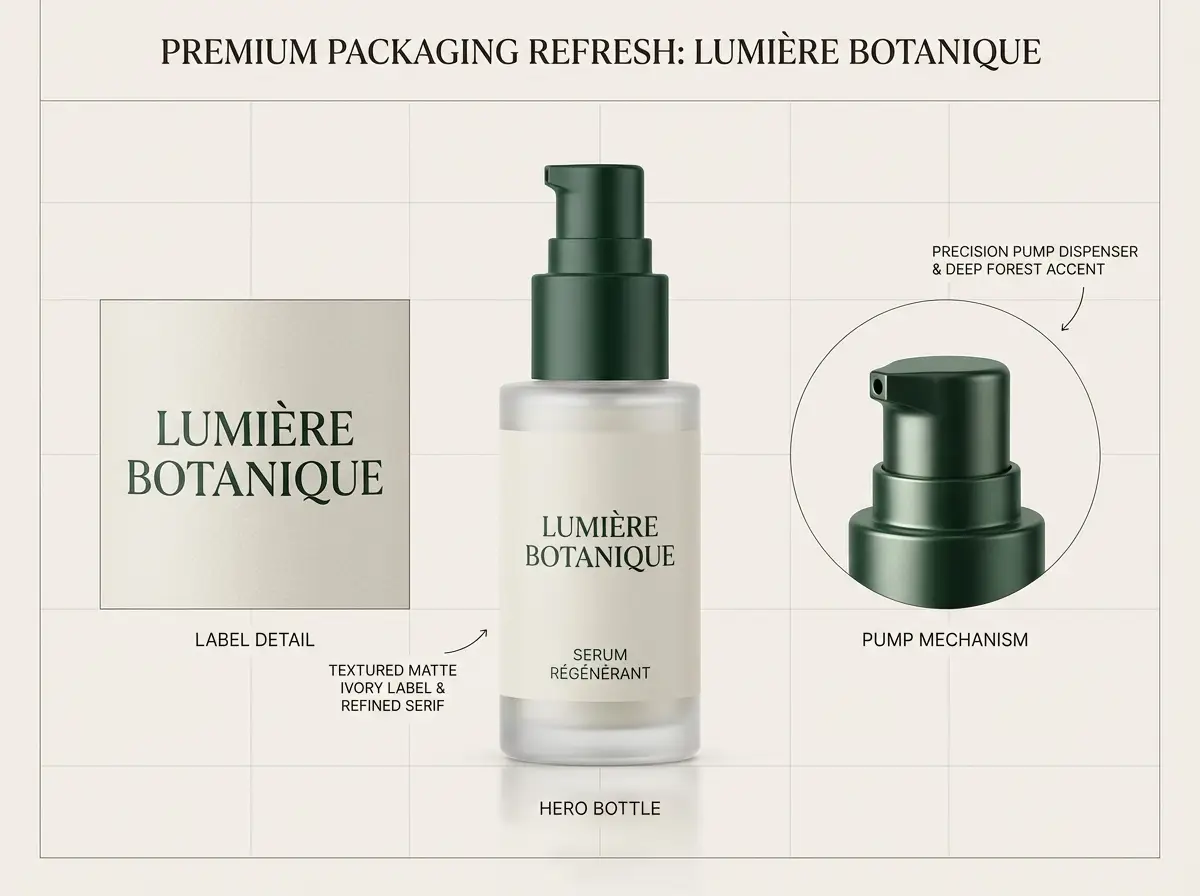
A premium packaging refresh board for a skincare bottle with clean labels and refined layout.

Premium packaging refresh board

Prompt formula

[product] + [what should stay] + [new label direction] + [materials / palette] + [board presentation]

View prompt detailsExpand

Full prompt

Create a premium packaging refresh board for a glass skincare bottle. Keep the bottle silhouette and pump structure consistent. Update the label direction to matte ivory with deep forest accents and a refined serif headline. Show one hero bottle, one close crop of the label, and short callouts that read "keep bottle shape", "new serif label", and "premium wellness palette". Use soft studio light, realistic reflections, and a clean design-review layout.

Why it works

Nano Banana Pro handles structured boards better when the prompt separates the stable product identity from the new label direction.

Output goal

A polished concept board for packaging reviews, brand design, or launch planning.

Tips

  • Say what must stay the same before listing what should change.
  • Use short callouts instead of long sentences when the image needs readable labels.
Text-aware layout

Good prompt fit

Best for menu boards and poster layouts where the text should still read like real copy.

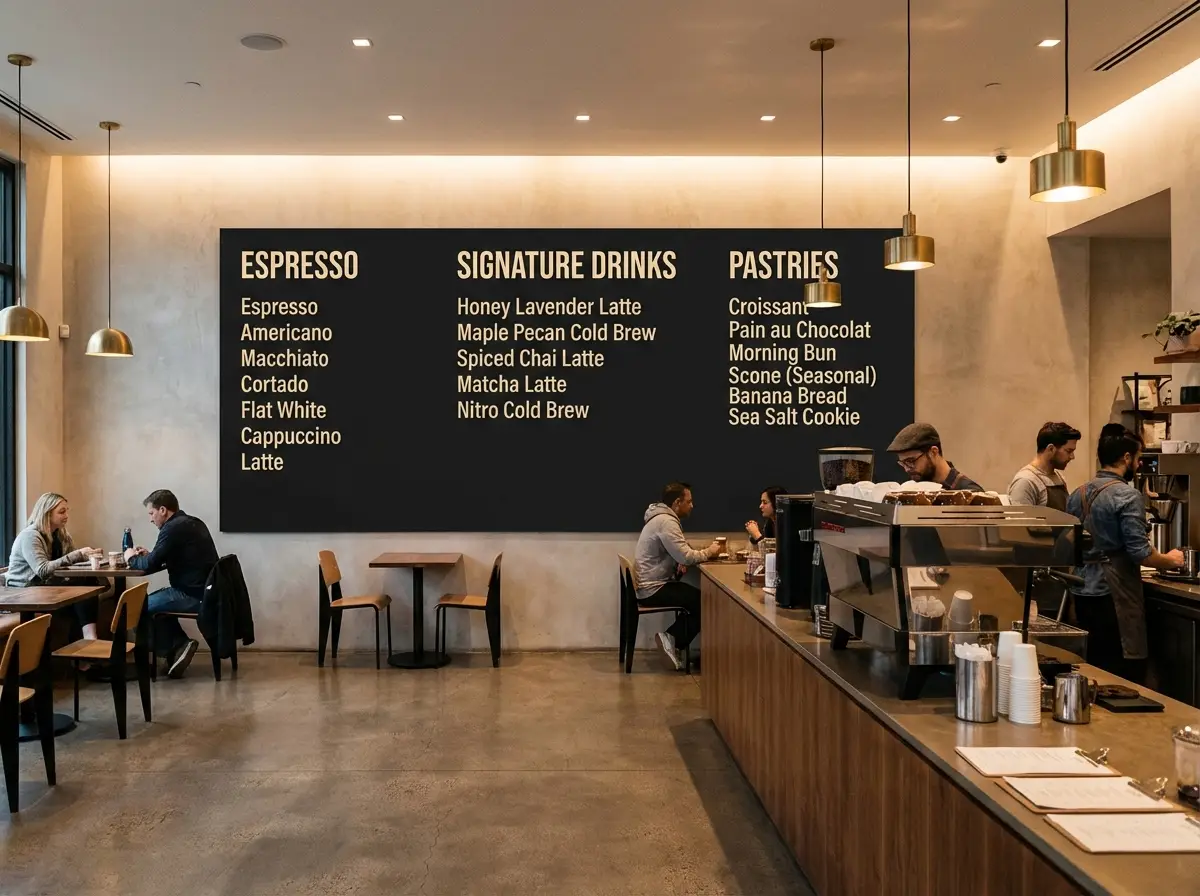
A readable cafe menu board with clean category headings and a premium interior presentation.

Readable cafe menu board

Prompt formula

[menu subject] + [exact headings] + [layout structure] + [interior style] + [readability note]

View prompt detailsExpand

Full prompt

Design a premium cafe menu board mounted inside a modern coffee bar. Use large readable category headings: "Espresso", "Signature Drinks", and "Pastries". Under each heading, add two short menu lines with simple pricing. Keep the board matte black with warm cream text, clean spacing, and a layout that feels like a real hospitality brand rather than decorative chalk art. Use soft indoor lighting and a realistic cafe interior around the board.

Why it works

This prompt keeps the text short, names the hierarchy, and tells the model that readability matters more than decorative typography.

Output goal

A readable menu concept for hospitality brands, cafe mockups, or retail visual direction.

Tips

  • Keep the copy short enough for the layout to stay plausible.
  • Describe the board style and the surrounding environment separately.
Product marketing

Good prompt fit

Best for premium product boards that mix a hero render, callouts, and short structured notes.

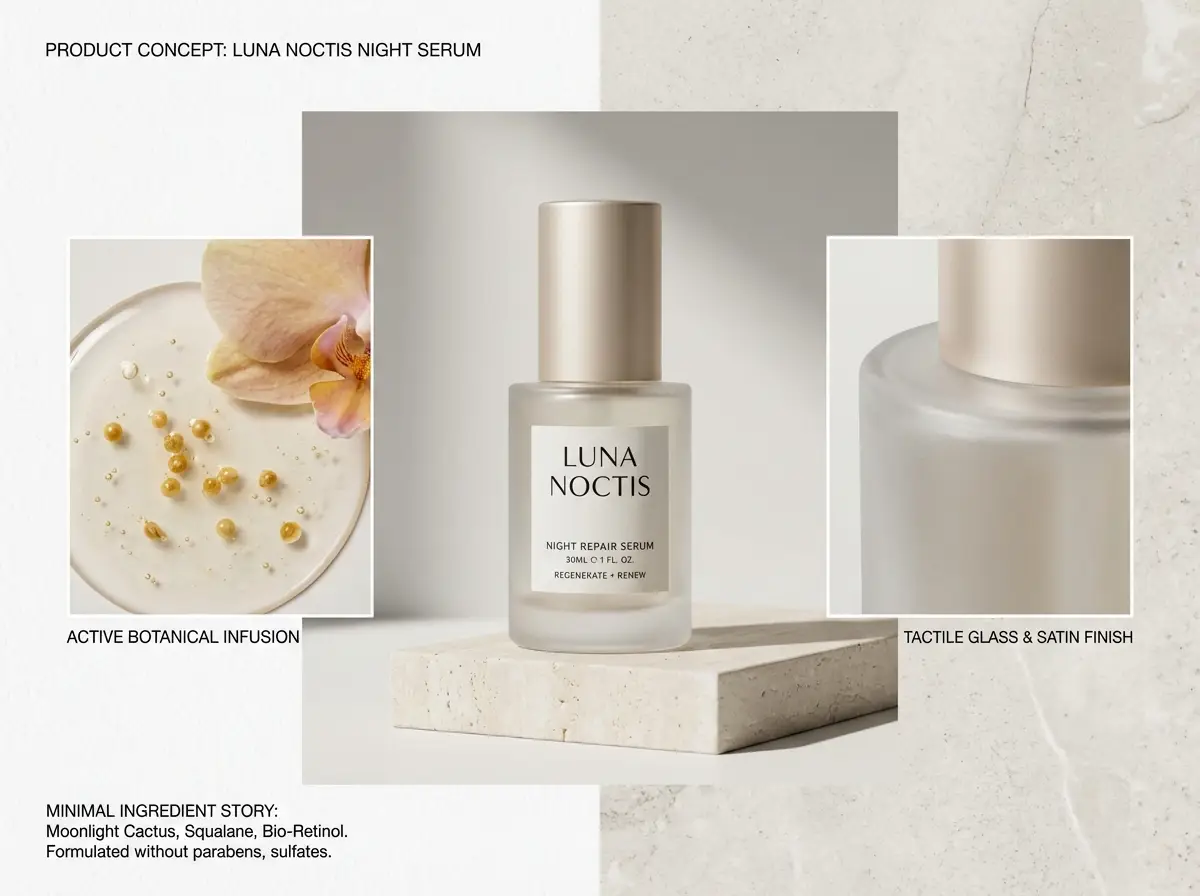
A skincare product board with a hero bottle, detail crops, and labeled design callouts.

Skincare product concept board

Prompt formula

[product] + [board sections] + [callout labels] + [brand mood] + [studio presentation]

View prompt detailsExpand

Full prompt

Create a skincare product concept board for a night serum. Show one large hero bottle in the center, two smaller detail crops, and short callout labels that read "glass bottle", "soft satin cap", and "minimal ingredient story". Use a white and pale stone background, restrained editorial typography, luxury skincare lighting, and a clean art-direction board layout suitable for an internal design review.

Why it works

Nano Banana Pro is stronger when the prompt gives a board structure instead of asking for a single floating beauty shot plus labels.

Output goal

A structured product board for brand reviews, launch decks, or internal visual alignment.

Tips

  • Name the board sections directly so the composition feels planned.
  • Use 2 to 4 short labels, not a paragraph of text.
Multi-reference edit

Good prompt fit

Best for multi-reference boards where product pieces, palette, and layout need to come from different inputs.

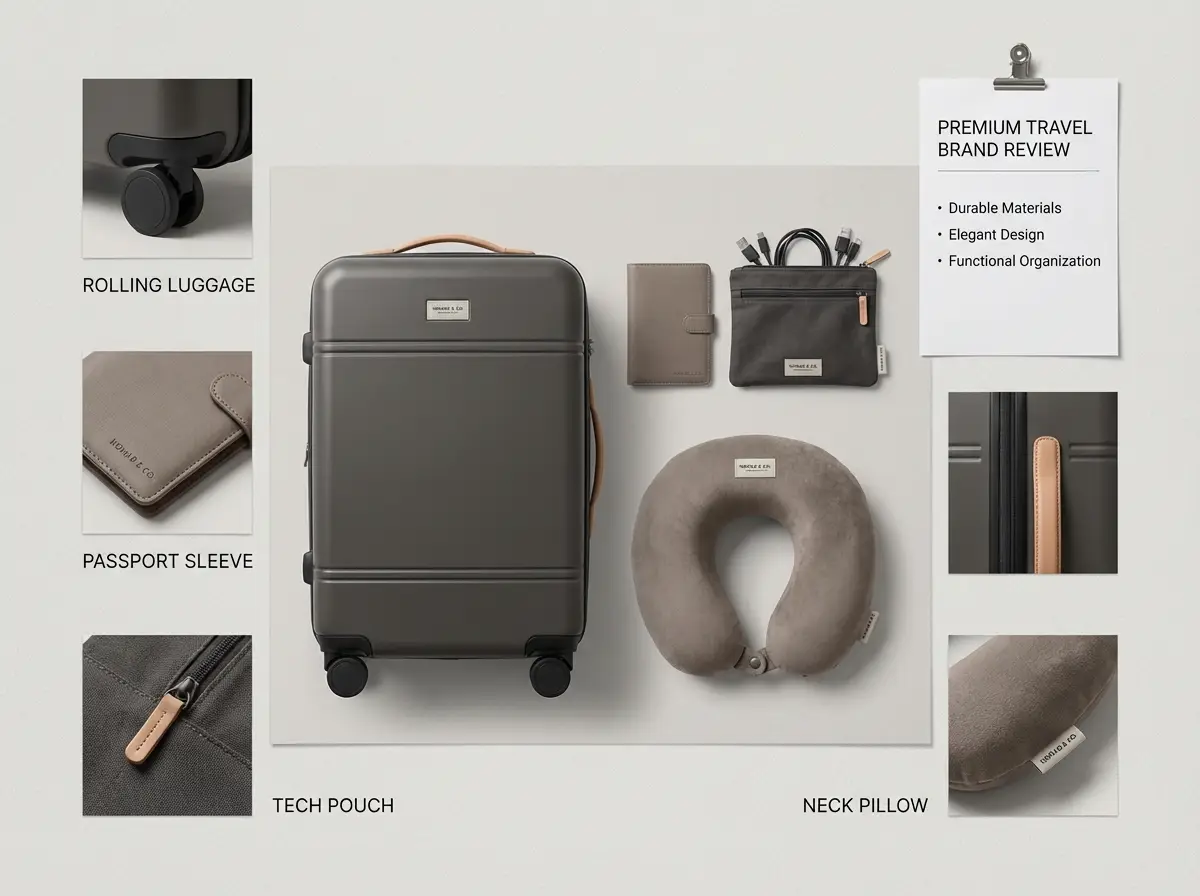
A travel kit concept board combining luggage, accessories, and coordinated color direction from multiple references.

Multi-reference travel kit concept

Prompt formula

[hero kit] + [reference roles] + [what should stay consistent] + [layout mood] + [output format]

View prompt detailsExpand

Full prompt

Create a premium travel essentials concept board using multiple references. Use one reference for the luggage silhouette, one for the pouch material, and one for the neutral taupe and charcoal color palette. Show the kit as a clean flat-lay board with a carry-on, passport sleeve, charging pouch, and neck pillow. Keep the styling cohesive, minimal, and realistic, with short labels for each item and a layout that feels like a premium travel brand review sheet.

Why it works

The prompt assigns a role to each reference and tells the model how the final board should unify them.

Output goal

A multi-reference concept board that merges several product directions into one polished visual.

Tips

  • State what each reference controls instead of uploading many images without roles.
  • Ask for one unified board, not several disconnected scenes.
When to choose Nano Banana Pro

Choose Nano Banana Pro when detail and polish matter more than raw speed

Nano Banana Pro fits best when the request is complex, the image needs readable copy or labeled structure, and the final output should feel more polished before it leaves the generator.

Choose Nano Banana Pro when the brief is long and the output has to hold up

Use it when the prompt reads like a real creative brief: exact text, product details, multiple references, and a layout that should stay organized from draft to final asset.

Use another model when speed, grounding, or open deployment matter more

Choose Nano Banana Flash for faster and cheaper iteration, Nano Banana 2 when web grounding is part of the task, and Z-Image when open weights or local deployment are part of the decision.

Community proof

Video walkthroughs and outside reviews for Nano Banana Pro

These videos show how creators use Nano Banana Pro for packaging edits, prompt techniques, and structured image workflows. They support the model positioning on this page without replacing the prompt examples above.

Video examples

FAQs

FAQ

About Seedance 2.0 and our platform

What is Nano Banana Pro?

Nano Banana Pro is Google's higher-fidelity hosted image model in this lineup. It is aimed at image generation and editing tasks where the prompt is long, the layout matters, and multiple reference images need to stay inside one request.

What is Nano Banana Pro best for?

Nano Banana Pro is a strong fit for product boards, packaging refreshes, posters with real copy, visual explainers, and branded marketing assets that need cleaner structure and more polished finishing.

Does Nano Banana Pro support image input here?

Yes. On this page, Nano Banana Pro supports up to eight reference images. That makes it practical for multi-image edits, product boards, and requests where palette, layout, and subject identity all need to stay closer to the brief.

Which resolutions and aspect ratios does Nano Banana Pro support here?

Nano Banana Pro supports 1K, 2K, and 4K here. The available aspect ratios include 1:1, 2:3, 3:2, 3:4, 4:3, 4:5, 5:4, 9:16, 16:9, 21:9, and auto.

How do I write better Nano Banana Pro prompts?

Write the prompt like a creative brief. Name the subject, explain the composition, quote any text that must appear in the image, and say what each reference image should control. Nano Banana Pro works better when the brief is explicit instead of keyword-heavy.

When should I use Nano Banana Pro instead of Nano Banana Flash or Nano Banana 2?

Choose Nano Banana Pro when fidelity, readable text, and a more polished final look matter more than pure speed. Use Nano Banana Flash when fast iteration and lighter-cost editing matter most. Use Nano Banana 2 when web grounding and newer multi-image workflows are part of the decision.

Can Nano Banana Pro generate readable text in images?

Yes. Nano Banana Pro is a strong option when the image needs menus, poster headlines, labels, callouts, or other short readable text that should stay part of the composition.

Can I use Nano Banana Pro images commercially?

For production work, treat Nano Banana Pro output like any other hosted model output: review the result for legal, brand, and policy requirements before publishing. Commercial suitability depends on your use case and the platform terms that apply here.

Still have questions? We're here to help

Join Discord
Related models

Compare Nano Banana Pro with other image models on this site

If Nano Banana Pro is not the exact fit for your workflow, compare it with these model pages for speed, grounding, hosted editing style, or open deployment tradeoffs.

Nano Banana Flash Image Generator

Open Nano Banana Flash when you want faster iteration, lighter editing loops, and a lower-cost hosted workflow.

Explore model

Nano Banana 2 Image Generator

Compare with Nano Banana 2 when optional web grounding and newer multi-image workflows matter more than pure polish.

Explore model

GPT-4o Image Generator

Try GPT-4o when readable text and diagram-like layout work matter but you want OpenAI's hosted editing style.

Explore model

Z-Image AI Image Generator

Compare with Z-Image when open weights, local deployment, and downstream customization are part of the model choice.

Explore model

Try Nano Banana Pro here

Open the generator, start with a detailed prompt, and add the reference images that should actually guide the output.

LogoSeedance 2.0 AI

Powered by Seedance 2.0 AI | Fast Video Generation | Professional Quality

TwitterX (Twitter)DiscordEmail
Resources
  • Blog
  • Create
  • Scenes
  • Works
  • Prompts
  • Seedance 2.0 API
Company
  • About
  • Contact
Legal
  • Privacy Policy
  • Terms of Service
  • Refund Policy
Image Models
  • Z-Image
  • GPT-4o
  • Flux 2
  • Flux 2 Pro
  • Flux 2 Klein
  • Qwen Image 2
  • Seedream 4.0
  • Seedream 4.5
  • Seedream 5.0
  • Grok Imagine
  • Nano Banana Pro
  • Nano Banana Flash
  • Nano Banana 2
Video Models
  • Google Veo 3.1
  • Google Veo 3.1 Pro
  • Seedance 1.5 Pro
  • Seedance Fast
  • Seedance Quality
  • Seedance 2.0
  • Hailuo 02
  • Kling v2.6
  • Kling v2.5 Turbo
  • Kling v2.1
  • Kling v2.1 Master
  • Kling v2 Master
  • Kling O1
  • Kling v3.0
  • Kling v3.0 Pro
Friends
  • Seedance AI
  • Seedream AI
  • Kling AI

This website is an independent third-party service built around Seedance-related workflows. We are not the official website of ByteDance or Seedance. Seedance and related trademarks belong to their respective owners.

© 2026 Seedance 2.0 AI All Rights Reserved. DREAMEGA INFORMATION TECHNOLOGY LLC
[email protected]