LogoSeedance 2.0 AI
  • Create
  • AI Image
  • AI Video
  • Prompts
  • Pricing
  • API
ReleasedDecember 2024

Grok Imagine Image Generator

Grok Imagine is xAI's hosted image model for photoreal and punchier visual generation. It is most useful when you want strong visual energy, clear subject direction, or a more dramatic default look for portraits, campaign concepts, or one-reference edits on this page.

Loading...

Prompt:

1:1

2:3

3:2

16:9

9:16

Model:

Loading...

No Preview

How to use Grok Imagine

Use Grok Imagine here for photoreal and more dramatic visual direction

Start with a strong scene description, keep the mood coherent, and use one reference only when the output should stay closer to a specific product, face, or environment.

01

Describe the scene and emotional direction clearly

Lead with the subject, setting, mood, and light quality so the frame has one strong direction from the start.

02

Use one reference when identity or layout should stay closer

Add a reference when the concept should remain closer to an existing product, pose, or visual direction instead of drifting into a totally new scene.

03

Tighten the image by adjusting mood, light, and camera language

Make targeted prompt changes around atmosphere, lens feel, and subject emphasis until the frame lands the right level of intensity.

Core strengths of Grok Imagine

What stands out about Grok Imagine as a bolder hosted route

Grok Imagine is most useful when you want a more assertive visual character, stronger campaign energy, and a hosted image route that can lean harder into dramatic prompts.

Useful for moody portraits and stronger attitude

Grok Imagine is a good fit when portraits, album-cover concepts, or fashion frames should feel bolder and more character-driven.

That makes it practical for streetwear, portraits, and mood-led campaign imagery.
It works best when the prompt should push a stronger visual stance.
Choose it when a calmer hosted route feels too restrained.

More energy for sports and campaign scenes

Grok Imagine is also useful for sports, nightlife, and performance-led campaign images where movement and atmosphere matter.

That helps with stronger motion cues and more dramatic night scenes.
It is a practical route when the frame should feel louder and more energized.
Use it when campaign tone matters as much as product clarity.

Stronger visual bias for bolder product heroes

Product scenes can also benefit when the image should feel more graphic, moody, or campaign-like instead of purely clean and restrained.

That makes it useful for beverage, entertainment, or culture-adjacent brand visuals.
It can push a more stylized hero direction than calmer hosted routes.
The product still needs a clear setup to keep the scene readable.

A better fit for cover art and culture-led framing

Grok Imagine works well when the brief should land closer to album cover, promo artwork, or entertainment design than pure product review imagery.

That opens up cover art, promo portraits, and culture-forward concept work.
It performs best when the prompt names one strong mood direction.
Use it when you want a more opinionated hosted result.
Best use cases

Where Grok Imagine works best

Grok Imagine works best when the image should feel photoreal, direct, and visually charged without relying on dense layout structure or heavy text rendering.

Portrait-led campaign frames

Use it for portraits, character-led visuals, and fashion-adjacent frames where lighting and attitude should do most of the work.

Nightlife and entertainment concepts

It is a good fit for nightlife posters, music visuals, key art drafts, and other images that need stronger energy than a neutral product render.

Product hero scenes with stronger mood

Use Grok Imagine when the product visual should feel dramatic, punchy, and cinematic rather than restrained and diagram-like.

Single-reference style or scene updates

A practical fit when one reference image should anchor the output while the mood, environment, or styling changes around it.

Prompt patterns and examples

How to write better Grok Imagine prompts with real examples

These examples focus on subject-first prompts with strong light and mood direction. Grok Imagine is most useful when the frame has one clear visual story instead of several competing looks.

Portrait concept

Good prompt fit

Best for direct portrait concepts where mood, light, and attitude matter more than complex layout structure.
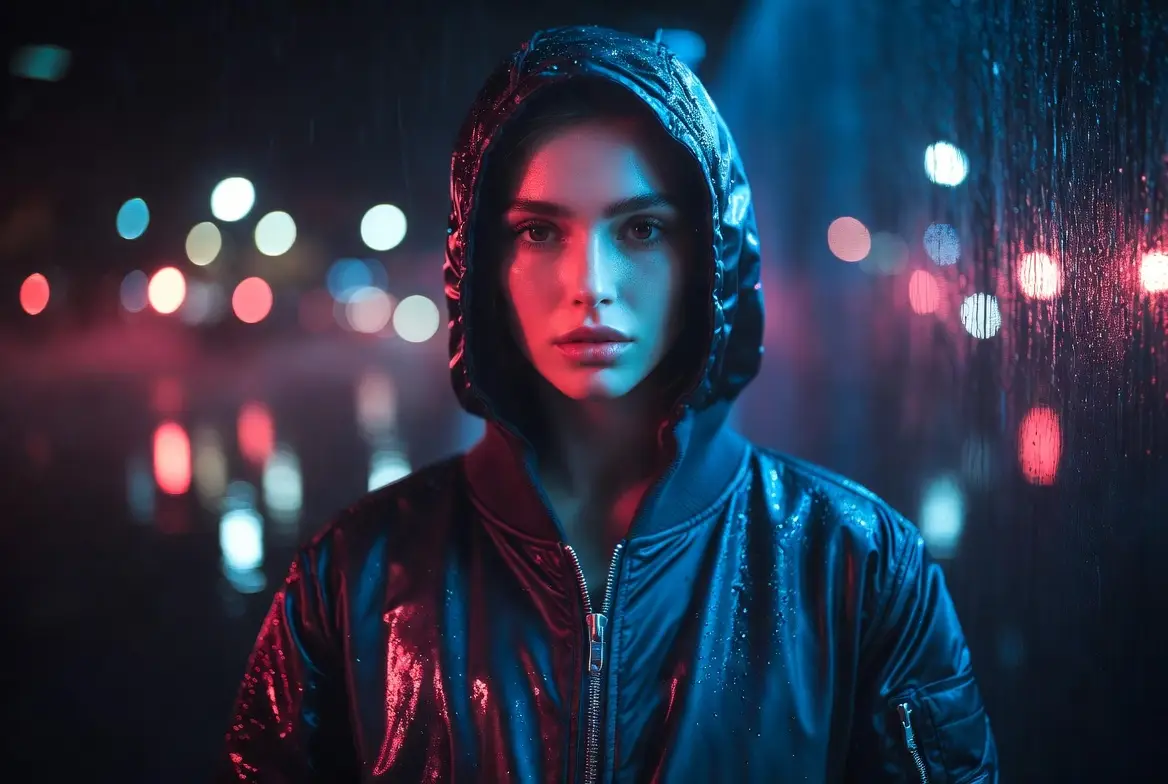
A moody streetwear portrait with strong lighting contrast and a clear editorial attitude.

Moody streetwear portrait

Prompt formula

[subject] + [wardrobe] + [setting] + [light] + [editorial mood]

View prompt detailsExpand

Full prompt

Create a moody streetwear portrait of a model in a deep navy bomber jacket standing under wet city lights after rain. Use a medium-close frame, cool neon reflections, soft skin detail, and a premium editorial music-campaign mood. Keep the expression calm and direct rather than theatrical.

Why it works

Grok Imagine responds better when the subject, setting, and light are all aligned around one strong mood direction.

Output goal

A portrait-led concept image for fashion, music, or brand campaign direction.

Tips

  • Let the light and setting support the subject instead of competing with it.
  • Choose one clear emotional tone for the portrait.
Campaign concept

Good prompt fit

Best for punchier campaign visuals with motion energy and stronger visual contrast.

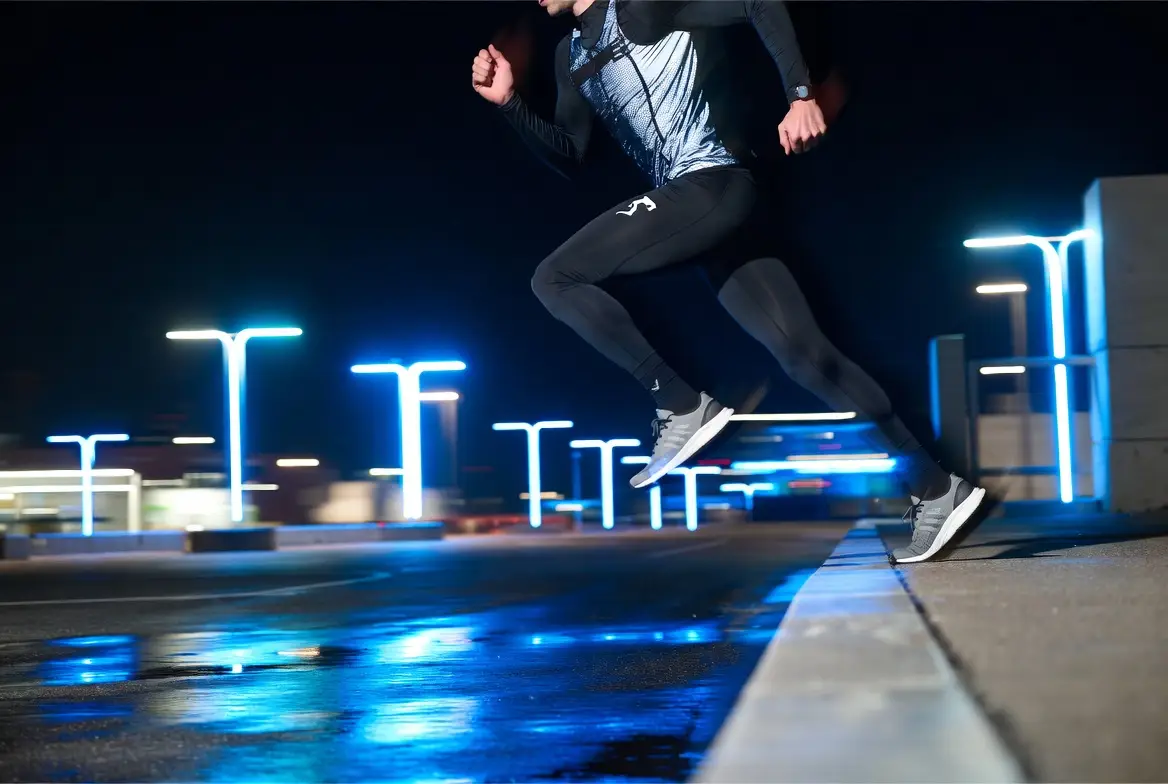
A night sports campaign frame with strong motion energy and dramatic city lighting.

Night sports campaign frame

Prompt formula

[subject] + [action] + [location] + [light quality] + [campaign energy]

View prompt detailsExpand

Full prompt

Create a night sports campaign frame of a runner stepping off a curb in reflective black performance gear. Use a low camera angle, electric blue city light, wet pavement reflections, and a sharp high-energy athletic campaign mood. The image should feel like a major sportswear brand key visual, not a lifestyle snapshot.

Why it works

The prompt keeps one subject, one action, and one lighting direction, which helps the frame feel intense without turning chaotic.

Output goal

A dramatic sports campaign concept for ad reviews or launch planning.

Tips

  • Use one action beat, not a full narrative sequence.
  • Tie the lighting directly to the campaign mood.
Product hero

Good prompt fit

Best for product visuals that should feel high-contrast, dramatic, and social-first.

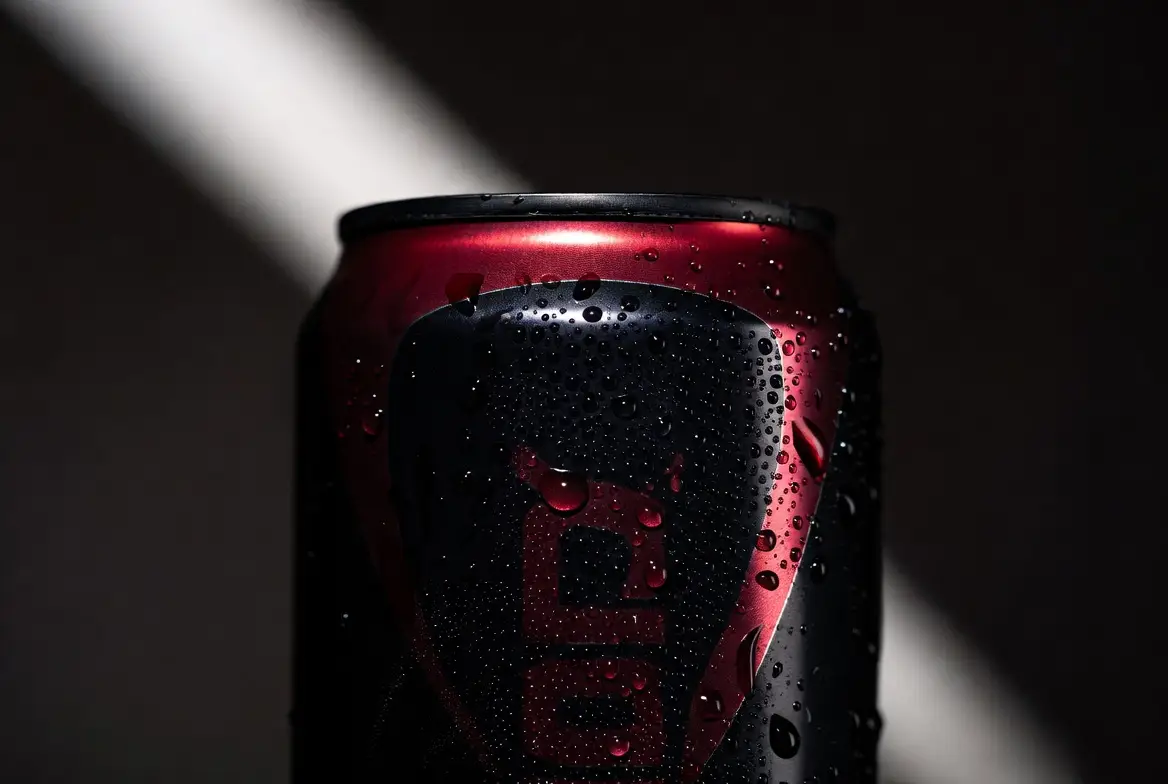
A bold beverage hero visual with dramatic color accents and strong commercial lighting.

Bold beverage hero visual

Prompt formula

[product] + [hero setup] + [color energy] + [light direction] + [campaign mood]

View prompt detailsExpand

Full prompt

Create a bold hero visual for a black cherry energy drink can. Show one can with cold condensation, deep crimson highlights, black reflective surfaces, and a dramatic spotlight from the upper left. Keep the background dark and minimal so the product feels loud, premium, and ready for a social campaign launch.

Why it works

This kind of product brief is built around contrast and mood, which matches Grok Imagine's stronger default visual energy.

Output goal

A punchy product hero image for launch concepts, ads, or social key art.

Tips

  • Use a small prop count when the product should dominate the frame.
  • Describe the color energy directly if the brand mood matters.
Cover concept

Good prompt fit

Best for portrait-led cover concepts where the mood should feel controlled, dramatic, and premium.

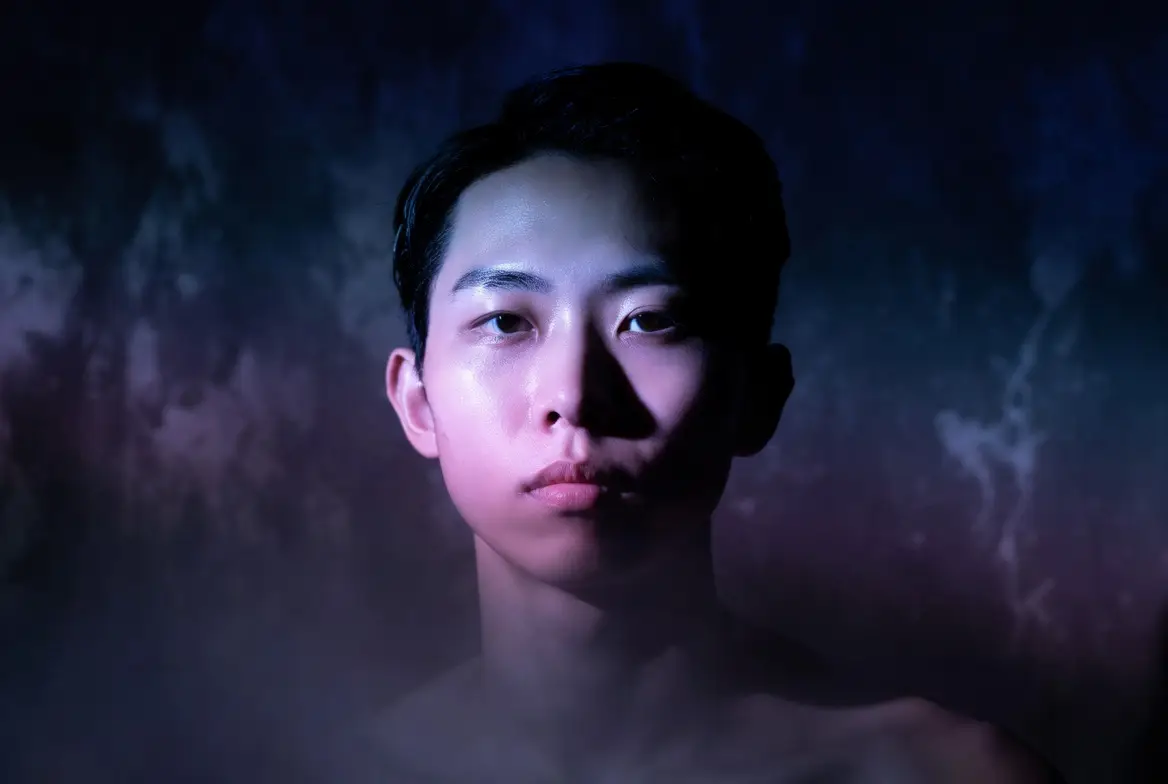
A premium album-cover portrait with controlled lighting and a moody centered composition.

Premium album-cover portrait

Prompt formula

[subject] + [light palette] + [background] + [composition] + [cover mood]

View prompt detailsExpand

Full prompt

Premium album-cover portrait concept. Front-facing subject under deep violet and steel blue light, dark textured background, soft haze, clean centered composition, realistic face, restrained dramatic mood, high-end music cover styling.

Why it works

The prompt keeps the frame centered on one face, one lighting mood, and one premium cover direction.

Output goal

A controlled cover concept for music visuals, entertainment branding, or creative direction.

Tips

  • Keep the lighting palette narrow so the cover mood stays coherent.
  • Describe the cover attitude directly instead of piling on extra styling references.
When to choose Grok Imagine

Choose Grok Imagine when visual energy matters more than text-heavy structure

Grok Imagine is the better fit when you want a punchier photoreal look, stronger mood, and a direct subject-first frame rather than a layout-heavy or diagram-like image workflow.

Choose Grok Imagine when the image should feel vivid, photoreal, and immediate

Use it for portraits, entertainment concepts, moody product heroes, and other visuals where atmosphere and visual intensity matter more than dense structure or many labels.

Use another model when text, structure, or open deployment matter more

Choose GPT-4o for readable text and diagram-like structure, Seedream 4.5 for a cleaner high-resolution poster route, and Z-Image when open weights or local deployment are part of the decision.

Community proof

Video walkthroughs and outside reviews for Grok Imagine

These videos add outside creator perspective on Grok Imagine and how people use it as a bolder hosted image route. They are here as supporting proof for the model positioning on this page.

Video examples

FAQs

FAQ

About Seedance 2.0 and our platform

What is Grok Imagine?

Grok Imagine is xAI's image-generation capability for photoreal and dramatic visual output. On this page, it is available as a dedicated single-model route for image generation and one-reference image edits.

What is Grok Imagine best for?

Grok Imagine is a strong fit for portraits, nightlife visuals, product hero frames, entertainment-style campaign concepts, and other work where the image should feel visually punchy right away.

Does Grok Imagine support image input here?

Yes. On this page, Grok Imagine supports one reference image. That makes it practical for single-reference edits where the output should stay closer to an existing product, pose, or scene direction.

Which aspect ratios does Grok Imagine support here?

Grok Imagine supports 1:1, 2:3, 3:2, 16:9, and 9:16 here. This page does not expose a separate resolution switch for the model.

How do I write better Grok Imagine prompts?

Lead with the subject and the mood, then describe the light, lens feel, and the exact visual energy you want. Grok Imagine works better when the prompt gives one strong scene direction instead of several competing styles.

When should I use Grok Imagine instead of GPT-4o or Seedream 4.5?

Choose Grok Imagine when you want a punchier photoreal look and a more dramatic visual default. Use GPT-4o when readable text or diagram-like structure matters more. Use Seedream 4.5 when you want a cleaner high-resolution route for polished poster or campaign work.

Is Grok Imagine good for portraits and campaign visuals?

Yes. Grok Imagine is useful for portrait-led visuals, nightlife concepts, performance-style key art, and brand images that need stronger visual intensity without turning into abstract art.

Can I use Grok Imagine images commercially?

For production work, review Grok Imagine output the same way you would review output from any other hosted image model. Commercial suitability depends on your use case, internal review standards, and the platform terms that apply here.

Still have questions? We're here to help

Join Discord
Related models

Compare Grok Imagine with other image models on this site

If Grok Imagine is not the exact fit, compare it with these related pages for text-aware editing, high-fidelity hosted output, higher-resolution poster work, or open deployment tradeoffs.

GPT-4o Image Generator

Open GPT-4o when readable text, annotations, and multi-reference layout work matter more than dramatic visual punch.

Explore model

Nano Banana Pro Image Generator

Compare with Nano Banana Pro when you want a more polished hosted route for structured briefs and product boards.

Explore model

Seedream 4.5 Image Generator

Try Seedream 4.5 when you want a different high-resolution path for polished poster or campaign work.

Explore model

Z-Image AI Image Generator

Compare with Z-Image when open weights, local deployment, and downstream customization matter more.

Explore model

Try Grok Imagine here

Open the generator, start with a strong subject-first prompt, and push the image through mood, light, and atmosphere changes until the frame lands.

LogoSeedance 2.0 AI

Powered by Seedance 2.0 AI | Fast Video Generation | Professional Quality

TwitterX (Twitter)DiscordEmail
Resources
  • Blog
  • Create
  • Scenes
  • Works
  • Prompts
  • Seedance 2.0 API
Company
  • About
  • Contact
Legal
  • Privacy Policy
  • Terms of Service
  • Refund Policy
Image Models
  • Z-Image
  • GPT-4o
  • Flux 2
  • Flux 2 Pro
  • Flux 2 Klein
  • Qwen Image 2
  • Seedream 4.0
  • Seedream 4.5
  • Seedream 5.0
  • Grok Imagine
  • Nano Banana Pro
  • Nano Banana Flash
  • Nano Banana 2
Video Models
  • Google Veo 3.1
  • Google Veo 3.1 Pro
  • Seedance 1.5 Pro
  • Seedance Fast
  • Seedance Quality
  • Seedance 2.0
  • Hailuo 02
  • Kling v2.6
  • Kling v2.5 Turbo
  • Kling v2.1
  • Kling v2.1 Master
  • Kling v2 Master
  • Kling O1
  • Kling v3.0
  • Kling v3.0 Pro
Friends
  • Seedance AI
  • Seedream AI
  • Kling AI

This website is an independent third-party service built around Seedance-related workflows. We are not the official website of ByteDance or Seedance. Seedance and related trademarks belong to their respective owners.

© 2026 Seedance 2.0 AI All Rights Reserved. DREAMEGA INFORMATION TECHNOLOGY LLC
[email protected]