Veo 3.1 Lite Prompt 가이드: 영화 같은 AI 영상을 위한 20개 이상 즉시 사용 가능한 Prompt
영화 같은 결과물을 얻기 위해 prompt Veo 3.1 Lite를 사용하는 정확한 방법을 배우세요. 샷 유형, 카메라 움직임, 오디오, 그리고 다양한 장르에 걸친 20개 이상 복사-붙여넣기 prompt를 다룹니다 — 쓸데없는 내용 없이
이 가이드에서 다루는 내용
- ✅ Veo 3.1 Lite에서 작동하는 5가지 구성 요소 prompt 공식
- ✅ 모델이 이해하는 샷 유형, 카메라 움직임, 렌즈 용어
- ✅ 네이티브 오디오(대화, SFX, 분위기 사운드)를 위해 prompt하는 방법
- ✅ 다양한 장르에 걸쳐 바로 복사해 쓸 수 있는 20개 이상의 prompt
- ✅ 크레딧을 낭비하게 만드는 가장 흔한 실수
Veo 3.1 Lite에서 Prompt하는 것이 다른 이유
Veo 3.1 Lite는 챗봇이 아닙니다 — 샷 브리프를 기다리는 비디오 디렉터입니다. 모호한 prompt는 일반적인 영상을 만들어내고, 구체적이고 구조화된 prompt는 당신이 의도한 대로 보이는 클립을 만들어냅니다.
이 모델은 영화 데이터로 학습되어 촬영 언어(샷 유형, 카메라 움직임, 렌즈 사양, 조명 조건)에 반응합니다. 이러한 용어를 사용하면 평범한 영어로 원하는 것을 설명하는 것보다 훨씬 뛰어난 결과물을 얻을 수 있습니다.
이 가이드는 prompt를 카피라이팅이 아닌 영화 촬영 관점에서 다룹니다.
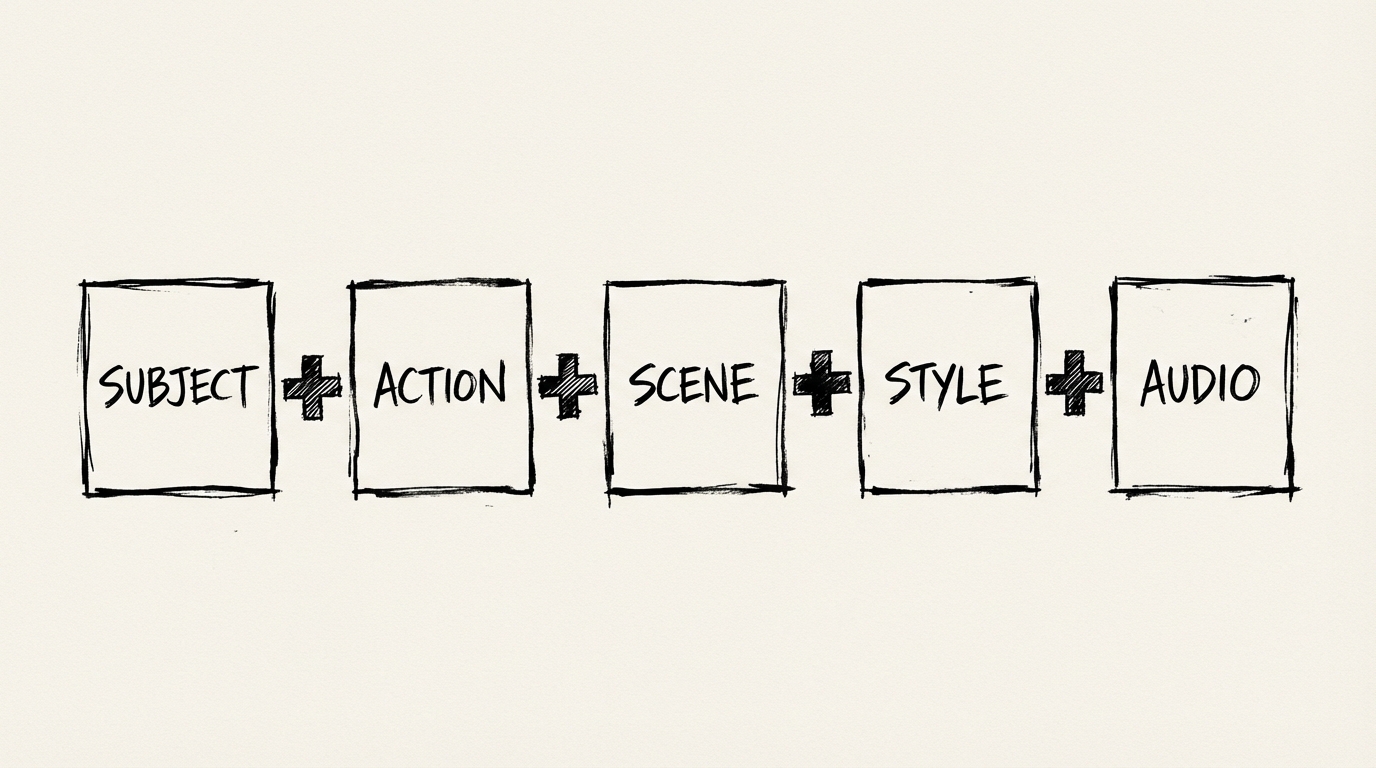
5가지 구성 요소 공식
모든 훌륭한 Veo 3.1 Lite prompt에는 이 5가지 요소가 포함됩니다:
| 구성 요소 | 제어하는 내용 | 예시 |
|---|---|---|
| 주제 | 초점이 맞춰진 대상 | a woman in her 40s, silver bob haircut |
| 행동 | 어떤 일이 일어나는지 | walks slowly through the frame |
| 장면 | 장소와 시간 | rainy Tokyo street at night, neon reflections on wet pavement |
| 스타일 | 시각적 미학 | cinematic 35mm film grain, shallow depth of field |
| 오디오 | 사운드 디자인 | SFX: rain and distant traffic, no music |
매번 5가지 요소를 모두 넣을 필요는 없습니다. 하지만 더 많이 구체화할수록 더 많은 제어권을 가집니다.
약한 prompt:
밤에 도시에서 걷는 여성.
강한 prompt:
미디엄 샷. 은발 단발을 한 40대 여성이 밤에 비가 내리는 도쿄 거리를 천천히 걷는다. 젖은 포장도로에 그녀 뒤편의 네온사인이 반사된다. 그녀는 한 번 카메라를 옆으로 흘겨본다. 35mm 필름 그레인, 얕은 심도. SFX: 비, 멀리 교통 소리, 젖은 콘크리트를 밟는 하이힐 소리.
주제는 같지만 결과는 완전히 다릅니다.
샷 유형: 모델에게 구도를 어떻게 알려줄 것인가
항상 샷 유형을 가장 앞에 배치하세요. Veo 3.1 Lite는 첫 문장을 먼저 읽기 때문에 구도 지시를 끝에 숨기면 종종 무시됩니다.
| 샷 유형 | 약어 | 용도 |
|---|---|---|
| 익스트림 클로즈업 | ECU | 질감, 감정, 단일 디테일 |
| 클로즈업 | CU | 얼굴, 표정, 친밀감 |
| 미디엄 샷 | MS | 대화, 허리 위 액션 |
| 와이드 샷 | WS | 환경, 규모 설정 |
| 익스트림 와이드 샷 | EWS | 웅장한 풍경, 고립감 |
예시:
Close-up shot. A man's hands carefully folding a paper crane. Soft natural light from a window left of frame. No music, just the sound of paper rustling.Extreme wide shot. A lone figure walks across a white salt flat at dusk. Heat distortion visible on the horizon. Silence.Medium shot. Two astronauts argue in a cramped space station corridor. Fluorescent lighting flickers overhead. Ambient hum of life support systems.카메라 움직임: Prompt 당 하나의 움직임
카메라 움직임을 지정하지 않으면 Veo는 기본적으로 정지되거나 살짝 떠있는 프레임이 됩니다. 클로즈업에는 괜찮지만 넓은 샷은 생기가 없어집니다.
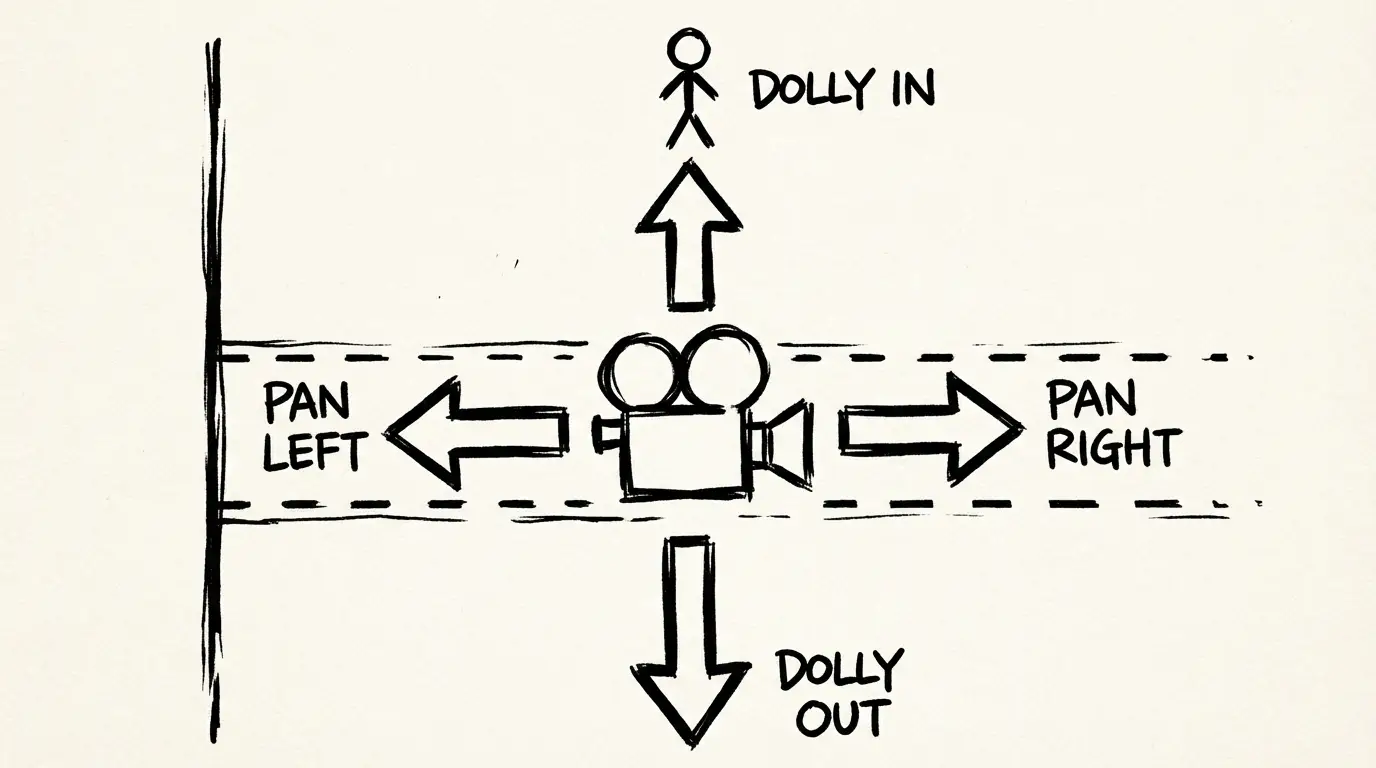
규칙: 클립 당 하나의 주요 카메라 움직임만 사용하세요. 움직임을 겹치면 모델이 혼란스러워합니다.
| 움직임 | 효과 | 사용할 때 |
|---|---|---|
dolly in | 피사체를 향해 이동 | 긴장감 조성, 감정 드러내기 |
dolly out | 피사체에서 멀어지며 이동 | 규모 드러내기, 장면 마무리 |
pan left / pan right | 수평으로 회전 | 움직임 따라가기, 환경 훑어보기 |
tracking shot | 피사체를 따라가며 이동 | 달리는 장면, 추격 시퀀스 |
crane shot rising | 카메라가 위로 올라감 | 웅장한 공개, 장면 전환 |
dolly zoom | 달리 + 줌을 반대 방향으로 이동 | 방향 감각 상실, 심리적 긴장감 |
카메라 움직임은 별도의 문장으로 작성하세요:
Wide shot. A fox trots across a snow-covered field at dawn.
The camera dollies in slowly as it pauses and looks directly at lens.
Pale morning light, no wind.
SFX: snow underfoot, distant bird call.
실제로 효과가 있는 렌즈 용어
렌즈는 다른 어떤 변수보다 심도와 감정적 거리를 제어합니다.
| 렌즈 | 느낌 | 사용할 때 |
|---|---|---|
16mm wide angle | 광활하고 가장자리가 왜곡됨 | 건축, 풍경, 액션 |
35mm | 자연스럽고 살짝 친밀함 | 다큐멘터리, 스트릿, 대화 |
50mm | 눈으로 보는 것과 같은 원근감 | 중립, 다용도 |
85mm portrait | 배경이 압축되고 친밀함 | 캐릭터 초상, 감정 |
telephoto 200mm | 매우 압축되고 감시하는 느낌 | 감시 분위기, 야생동물 |
렌즈 용어를 사용한 예시:
Close-up. 85mm portrait lens.
A chef tastes from a wooden spoon in a busy kitchen.
His expression shifts from concentration to satisfaction.
Warm practical lighting from overhead heat lamps.
SFX: kitchen noise fades as he focuses, brief silence, then resumes.
오디오를 위해 Prompt하는 방법
Veo 3.1 Lite는 자동으로 네이티브 오디오를 생성하지만, 생성되는 내용은 전적으로 당신이 지정한 내용에 따라 달라집니다. 오디오 prompt 없이는 일반적인 분위기 사운드 믹스가 나오고, 지정하면 의도한 결과물을 얻을 수 있습니다.
제어할 수 있는 3가지 오디오 요소:
1. 대화
대화는 큰따옴표로 감싸고 화자를 지정해주세요:
A man in a grey suit sits across a boardroom table and says,
"We don't have time to wait for the perfect moment."
2. 효과음 (SFX)
SFX: 접두사를 붙이고 구체적으로 작성하세요:
SFX: glass shattering on marble floor, then silence.SFX: typewriter clacking, street noise through an open window, coffee cup placed on wood.3. 주변 환경음
Ambient:를 사용하거나 장면의 사운드스케이프를 묘사하세요:
Ambient: the low electrical hum of a server room, no other sound.Ambient: busy café — espresso machine, murmured conversations, jazz from a speaker in the corner.즉시 사용 가능한 20개 이상의 Prompt
이 내용을 생성기에 그대로 복사하세요. 모든 항목은 Veo 3.1 모델 패밀리에서 테스트되었습니다.
광고 / 제품
Medium shot. A barista pours steamed milk into an espresso, creating a slow-motion latte art bloom.
Camera dollies in slightly as the pattern forms.
Warm coffee-shop lighting, shallow depth of field on the cup.
SFX: steam hiss, the soft clink of ceramic, faint café ambience.
Extreme close-up. A luxury watch's second hand sweeps across the dial in real time.
Camera static, 85mm lens.
Deep black background, single overhead key light catching the sapphire crystal.
SFX: quiet ticking, nothing else.Wide shot. An electric SUV rounds a coastal cliff road at sunrise, ocean below.
Camera pans right to follow the car, then holds as it disappears around the bend.
Golden hour light, light lens flare.
SFX: electric motor hum, wind, distant waves.시네마틱 / 내러티브
Close-up. An elderly woman reads a handwritten letter.
Her eyes move across the page, then stop.
She folds it slowly without finishing.
Natural window light, 50mm, slight film grain.
SFX: paper folding, ambient silence of an old house.
Wide shot. A lone astronaut floats outside a space station against the curve of Earth.
Static camera.
The ISS passes slowly left to right behind them.
SFX: breathing inside a helmet, the faint hiss of suit pressurization.Medium shot. Two detectives stand at a rain-soaked crime scene at night.
Police lights flash blue and red in the background.
One says, "This wasn't a robbery."
The other doesn't respond.
SFX: rain, radio chatter in the distance, wet footsteps.소셜 / 세로형 (9:16)
Vertical 9:16 format. Close-up.
A hand pours honey from a jar in slow motion.
The stream catches golden afternoon light from a window behind.
Minimal background — clean white marble counter.
SFX: soft drizzle of honey, ambient silence.
Vertical 9:16 format. Medium shot.
A street food vendor flips a dumpling pan with one clean motion, steam rising.
Busy night market visible out of focus behind them.
Handheld camera feel, warm practical lighting from the stall.
SFX: sizzling, crowd noise, vendor calling out in Cantonese.건축 / 환경
Crane shot rising. A brutalist apartment complex at dusk.
Camera starts at street level looking up, rises slowly to reveal the rooftop against a purple sky.
Overcast, diffused light.
SFX: city ambience fading as camera rises, wind picks up.
Wide tracking shot. Camera moves slowly down a bamboo forest path.
No people, early morning mist.
Monochromatic green palette, natural light from above.
SFX: wind through bamboo, occasional bird, footsteps on packed earth.패션 / 라이프스타일
Vertical 9:16. Medium shot.
A model in an oversized linen blazer walks through a sunlit alley.
She turns once toward the camera, then continues.
Backlit, hazy afternoon light, handheld slight movement.
SFX: light footsteps, ambient city sound at low volume.
크레디트를 낭비하는 흔한 실수들
1. 여러 동작을 동시에 지정하는 경우
A man runs across a rooftop while checking his phone and shouting into the wind.
모델은 경쟁하는 3가지 동작을 처리할 수 없습니다. 클립 당 하나의 주요 동작을 선택하세요.
2. 모호한 그룹 크기
A crowd of people는 지오메트리 불안정성을 유발합니다. 안정적인 다인물 장면을 위해 a small group of colleagues 또는 three people를 사용하세요.
3. 긍정적인 대안이 없는 부정적 명령
No buildings in the background는 종종 실패합니다. 대신: a desolate field with no structures in sight.
4. 여러 카메라 움직임을 겹쳐서 지정하는 경우
Dolly in while panning left and tilting up는 불안정한 움직임을 만듭니다. 클립 당 한 가지 움직임만 지정하세요.
5. 구도 명령이 없는 경우 샷 유형을 생략하면 모델이 임의로 선택합니다. 보통 중간 크기 샷을 선택하므로, 원하는 구도가 있다면 반드시 명시해야 합니다.
시청하기: 전문가처럼 Prompting하기
이 분석은 Veo 3.1에서 약한 prompt와 강한 prompt를 구분하는 실제 사례를 다룹니다:
Veo 3.1 Lite에서 이 Prompt를 직접 사용해보세요
특히 image-to-video를 사용하시는 경우 제품 사진 입력 팁과 I2V 전용 prompt 템플릿이 담긴 전용 Veo 3.1 Lite 이미지-비디오 변환 가이드를 참고하세요.
위의 모든 prompt는 Veo 3.1 Lite에서 작동합니다. 8초당 20크레디트이므로, 최종 렌더링을 하기 전에 100크레디트로 5가지 테스트 변형을 실행해 원하는 결과를 찾을 수 있습니다.
→ Veo 3.1 Lite 생성기 열기 — 위의 prompt를 붙여넣고 몇 초 만에 생성하세요.
자주 묻는 질문
고지
Prompt 예시와 기법 가이드는 Google의 공식 Veo 3.1 prompting 문서와 커뮤니티 테스트를 기반으로 합니다. 결과는 모델 티어에 따라 다를 수 있습니다.
작성자

카테고리
더 많은 글
PixVerse V6: 시네마 카메라 컨트롤, 네이티브 오디오, 15초 클립
PixVerse가 2026년 3월 30일 V6를 출시했습니다 — 20개 이상의 시네마 카메라 컨트롤, 네이티브 오디오 동기화, 멀티샷 엔진, 최대 15초 길이의 1080p 네이티브 출력을 지원합니다. 어떤 점이 바뀌었고 여러분의 워크플로우에 적합한지 알아보겠습니다.

Google Veo 3.1 라이트: Veo 3.1 Fast 대비 절반 가격, 동일한 속도
Google는 2026년 3월 31일에 Veo 3.1 라이트를 출시했습니다 — 720p 기준 초당 $0.05로 Veo 제품군에서 가장 저렴한 모델입니다. 여기서는 이 모델이 할 수 있는 것, 할 수 없는 것, 그리고 여러분의 워크플로우에 적합한지 여부를 알려드립니다.
Wan 2.7 vs Wan 2.6: 실제로 무엇이 달라졌을까
Wan 2.7에는 Wan 2.6에 없었던 첫/마지막 프레임 제어, 9-그리드 이미지 입력, multi-reference 비디오, 명령어 편집 기능이 추가되었습니다. 어떤 점이 바뀌었고 각 버전을 언제 사용해야 하는지 실용적으로 정리했습니다